Organize in Library
Create folders for the service, then drag Bible passages, songs and images into the order your team needs.
 SHINE by Heaven
Presentation software for congregations
SHINE by Heaven is lightweight, powerful visual presentation software for small and medium-sized congregations. Organize Bibles, songs, images and Live Output with a direct drag-and-drop system.
 IPHONE & IPADDownload the mobile app to control SHINE by Heaven remotely.
 ANDROIDDownload the mobile app to control SHINE by Heaven remotely.
DOWNLOAD FORAndroid
ANDROIDDownload the mobile app to control SHINE by Heaven remotely.
DOWNLOAD FORAndroid
What SHINE does
SHINE keeps Library, the preparation workspace and Live Output in one continuous flow. The operator can organize content, confirm what the audience will see and send it without losing context.
Create folders for the service, then drag Bible passages, songs and images into the order your team needs.
Open the item, adjust its content and use Preview or Live Output to confirm the audience view before sending.
The dark-blue paper plane is SHINE’s universal Send icon. After sending, the item turns dark pink; LIVE identifies what is currently on air.
How SHINE works
Bible, songs and Mobile App in one continuous workflow.
Bible and Live
Search, select and organize verses while Live Output remains visible in the same workspace.
Songs
Song Flow helps organize lyrics and keep the next section of the presentation ready.
Mobile App
Authorized administrators can open the connected Library and send content to the presentation computer through SHINE Remote.
SHINE Bible
Find a passage by direct reference, Search, Quick Search or the visual Bible Navigator. Select one verse or a continuous group, then drag it or add it to a Library folder without leaving the reader.
Focus + Shortcut
Focus turns a Bible passage or song into a clean sequence of readable slides. Search stays close, the current and next slides are clear, and the operator can move quickly without losing Live Output.
In timed mode, type a verse number and SHINE sends it after the chosen delay. In key mode, type the number and confirm with Enter—or another configured key. Bypass can jump to a requested Bible verse even when it is outside the currently prepared slide range.
Songs + YouTube
Search YouTube and supported open web lyric sources, review the recommendation, compare matches and edit before saving. Streaming depends on YouTube availability and can occasionally be interrupted by the source.
SHINE ecosystem
Authorized administrators can help with the organization Library from the Mobile App. The desktop computer remains the presentation authority while SHINE Remote keeps the connected team in sync.
Compatibility
Windows and Mac share the same SHINE experience. Check here whether your computer is compatible.
Practical minimum: 64-bit Windows 10 22H2, 2-core Intel or AMD x64 processor, 4 GB memory, 3 GB free storage and a 1280 × 720 display. Integrated graphics are sufficient.
Recommended: 64-bit Windows 11, 4 cores, 8 GB memory, SSD and a Full HD display.
Target minimum: macOS 12 Monterey, Intel x64 or Apple Silicon Mac, 4 GB memory, 3 GB free storage and a 1280 × 720 display.
Recommended: macOS 13 or later, 8 GB memory and SSD.
Windows 7, 8 and 8.1 are not supported by the current engine. Windows 11 is recommended. The Universal Mac release is signed and notarized by Apple for Intel and Apple Silicon.
SHINE memberships
SHINE Desktop and its core presentation workflow stay free. Premium adds the SHINE by Heaven iOS App, Web access and connected creation tools; Ultra expands capacity and Store access.
The complete core workflow for presenting from one computer.
Connected tools for a focused team.
Everything in Free, plus:
The complete SHINE membership.
Everything Premium has, plus:
One-time plugin purchases remain yours without Ultra. Membership access and individually purchased licenses are kept separate.
SHINE Store catalog
An individual plugin purchase stays licensed to this SHINE account even if Ultra ends. Stripe handles payment details; SHINE receives only the verified purchase and license state.
Type a Bible reference and send the prepared passage to the active screen without rebuilding the service.
Jump to a verse by number, use timed or key confirmation, and reach a passage outside the prepared range with Bypass.
Keep the current and next content clear in a focused operating view built for fast live presentation.
Add a selected Bible passage directly to the right Library folder without leaving the reader.
Prepare audio from a file or YouTube, save reusable sources, and play sound while the current Live visual stays visible.
Audio Overlay, Dictionary, Media Link, YouTube Tab and Clear Live can be installed without a paid membership.
Birthday and Floral Events are Ultra-only experiences. They are not sold as individual one-time products.
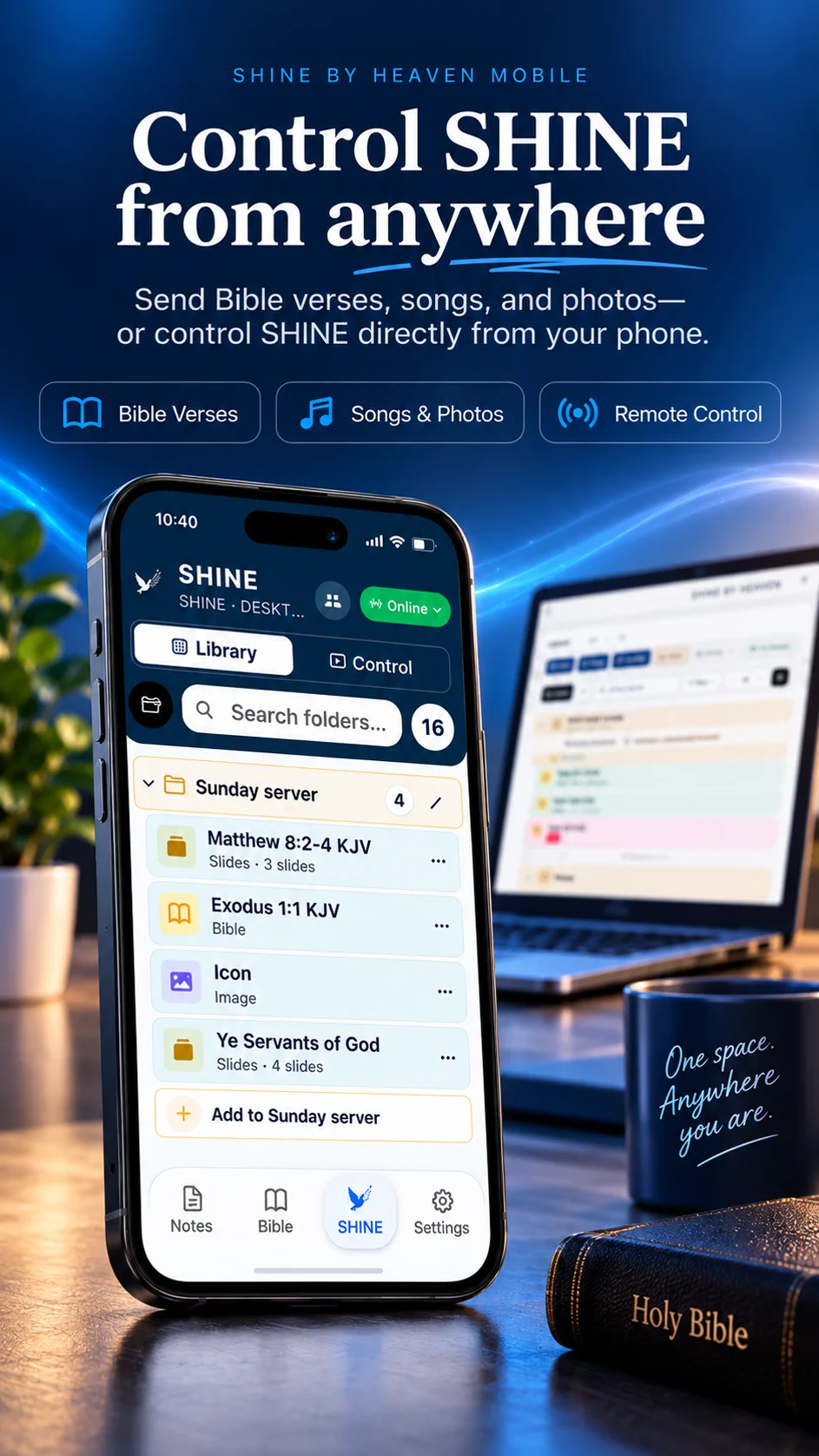
Desktop + Mobile App
Connect an authorized account, open the service Library and send content to the computer while SHINE Remote is Online and both devices have internet access.